Images
Images on the N64 are mainly used in two ways: as textures for 3D, and as sprites in 2D.
Both on the source and runtime side they are treated mostly the same,
but have different limitations to keep in mind.
Currently only PNG files are supported as source images.
Limitations
If you want to use images as textures, you have to consider the limited TMEM size.
TMEM refers to the texture-memory of the N64’s RDP, which is only 4KB in size.
From a more modern perspective, you can see it as VRAM that can only hold textures.
The RDP doesn’t offer any dynamic texture loading.
Meaning that each triangle or quad drawn can only use what is currently loaded.
Practically this means materials in 3D can only use textures that fit into 4KB.
Thanks to Libdragons sprite library, handling arbitrary sized images is possible in 2D.
Internally it will split loads when needed, something not realistically doable in 3D.
Formats
The N64 supports different runtime formats, which are a direct hardware feature.
Name |
Max. Pixels |
Description |
Color-Depth |
Alpha-Depth |
|---|---|---|---|---|
RGBA32 |
1024 |
Color + Alpha |
8 bit |
8 bit |
RGBA16 |
2048 |
Color + Alpha |
5 bit |
1 bit |
CI8 |
2048 |
Palette (RGBA16 or IA8) |
5 or 8 bit |
1 or 8 bit |
CI4 |
4096 |
Palette (RGBA16 or IA8) |
5 or 8 bit |
1 or 8 bit |
IA8 |
4096 |
Monochrome + Alpha |
4 bit |
4 bit |
I8 |
4096 |
Monochrome, also used as Alpha |
8 bit |
(alpha = color) |
IA4 |
8192 |
Monochrome + Alpha |
3 bit |
1 bit |
I4 |
8192 |
Monochrome, also used as Alpha |
4 bit |
(alpha = color) |
YUV |
2048 |
Luma/Chroma |
- |
none |
RGBA32 and RGBA16 are pretty straightforward, they just store color directly.
The Monochrome formats only have a single color channel, and optionally alpha.
Meaning that channel gets used for red, green and blue at the same time.
If they don’t have alpha, the color channel is then used for that too.
So if you e.g. need an alpha-gradient, you can still use an I8 image.
CI4 and CI8 are indexed formats, meaning they are split into a palette and indices.
The ‘4’ or ‘8’ dictate how many unique colors you can have, being 16 or 256 respectively.
The palette itself can be either RGBA16 or IA8 independent of that.
With CI4 you can have 16 different palettes at once, with CI8 only one.
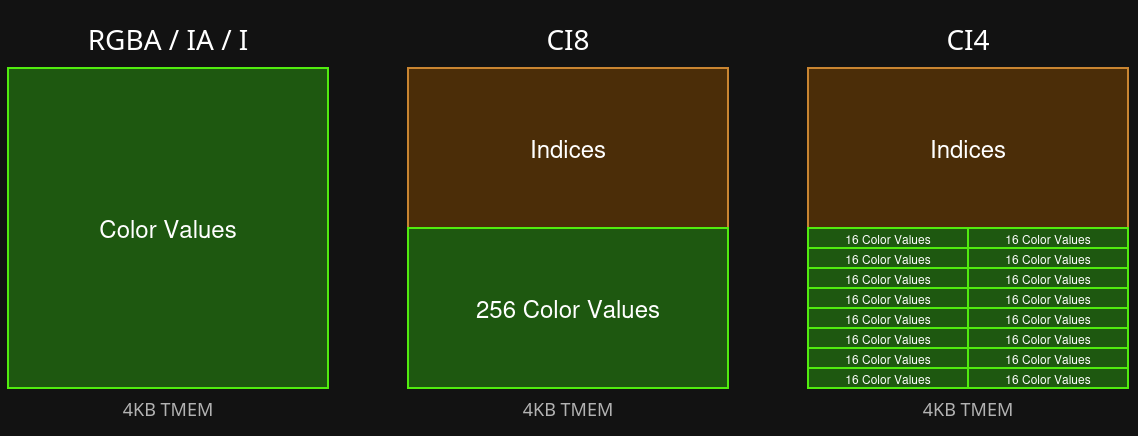
The RDP forces a fixed layout for CI textures in TMEM.
So it is not possible to minimize palette size to gain more indices or vice versa.
If you run the numbers, you will also see that palettes take up more space than they should.
This is due to the fact values are duplicated due to hardware requirements.
All of those details are handled for you however, so in the worst case you just get an error
that the texture doesn’t fit into TMEM.
Lastly we have YUV, which is a special format that is rarely used.
It stores luma and chroma separately, and requires some extra runtime setup to decode.
Unless you have a specific use-case for it, you can safely ignore it.
Creating Images
Generally any PNG will do just fine.
Ideally you keep the source images in the highest quality possible,
and only adjust dimensions beforehand.
The editor allows you to set a format per asset, where the build process then handles a conversion.
For example, if you want to use CI8 as a texture, there is no need to reduce colors beforehand.
The build process will take care of that while preserving good quality as much as possible.
Performance
The main cost with textures comes form their runtime size,
simply because it takes up memory traffic.
So it is a good idea to keep the image dimensions as small as possible,
and choose the most compact format that fits your needs.
Once loaded into TMEM, the access cost is always the same
no matter the dimension, format or size.
So reusing the same textures without loading different ones in between
is a good way to save on performance.