Object Lifecycle & Events
This page describes what stages objects in a scene go through
as well as what events they may receive.
If you haven’t already, please check the Intro - Scene docs first.
Object Creation
Before being added to a scene, the object itself is first initialized.
This internally allocates one linear block of memory for the entire object and its components.
Followed by running the init functions on components.
The sequence looks like this:
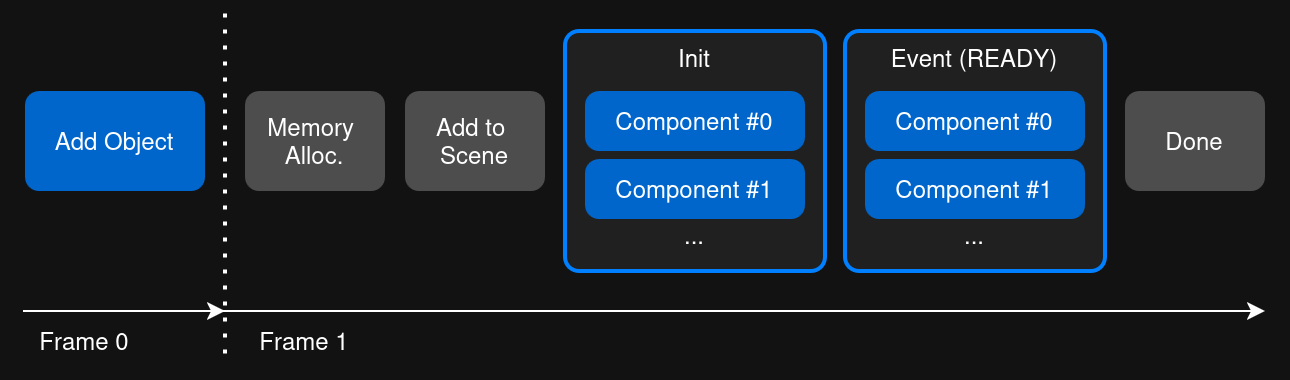
Both manually spawning an object and the initial scene load behave almost the same.
The only difference is that a manual spawn is deferred until the next frame,
while the initial scene load, of course, happens immediately.
Deferring is needed to avoid unwanted modifications to the scene state while it is being processed.
The component init phase is also where any of your attached C++ scripts get called.
First with the init function, if it has any, and once all components are done, with an event.
Note that inside the init function, the only guarantee you have is that the object itself exists.
Meaning it is in the scene graph, and you can access its direct properties (e.g.: position).
Depending on order, other components may not be initialized yet.
If you need to access them, you can listen to the ready event (EVENT_TYPE_READY) and put additional logic there.
Multiple Objects
So far we only considered one object,
but during the initial scene load many more are loaded at once.
The logic is exactly the same, where each stage just goes over all objects.
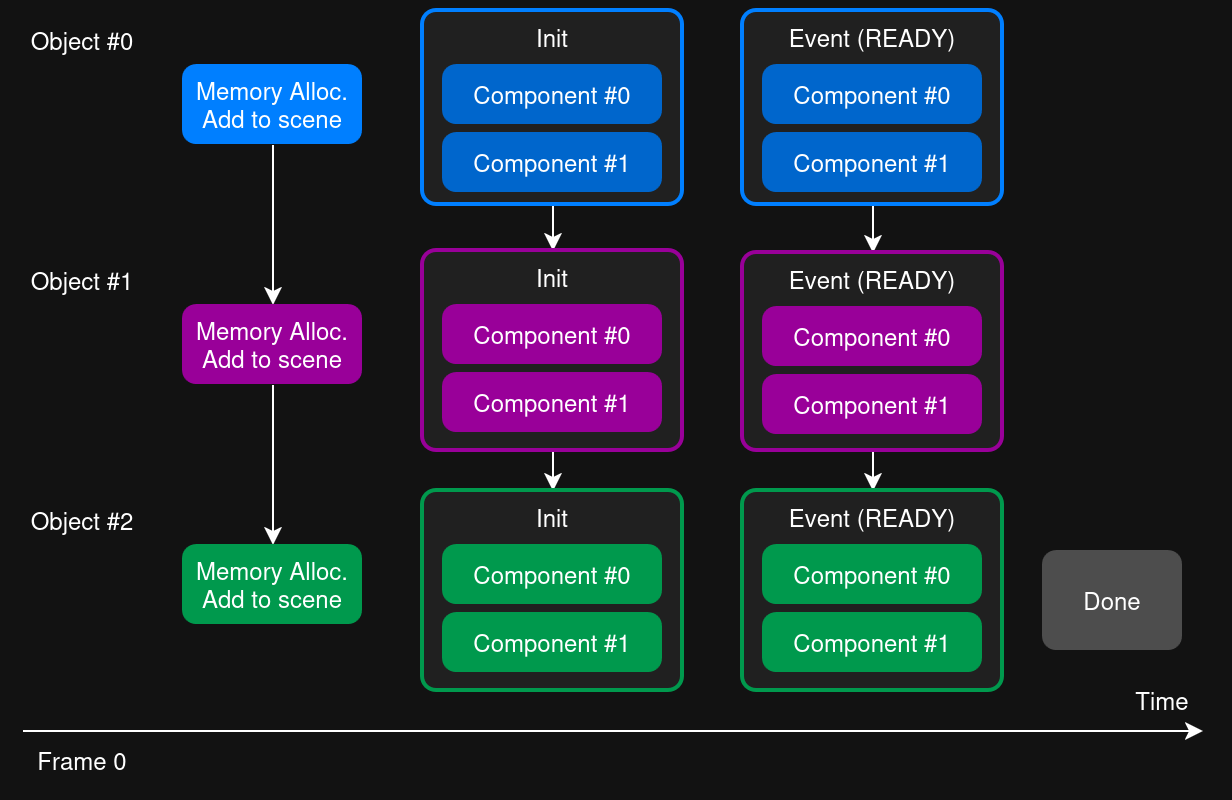
Accessing other objects during init needs the same care as accessing components.
That is besides the object itself existing (and the ID being valid), it may not be initialized yet.
The order in which objects are processed it guaranteed to be the same as the order they are listed in the scene graph.
There is no special handling of parent-child relationships, however,
since children always come after their parents, the parent will be called first.
Object Runtime
Once added to the scene, the object will now get called each frame in various situations.
Across a frame with once again 3 objects, it may look like this:
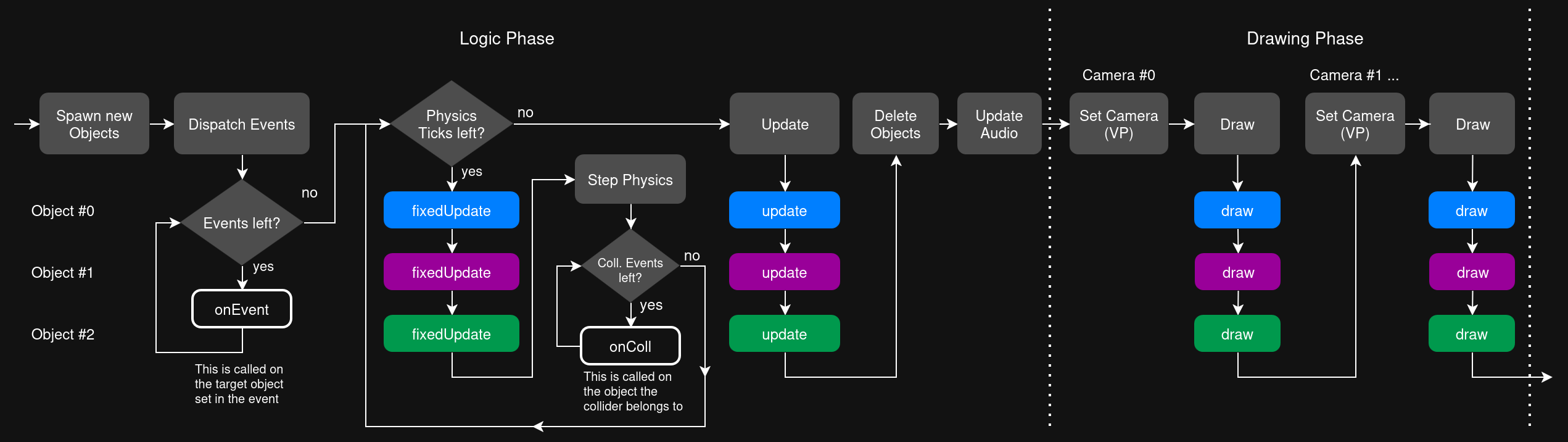
Like in the earlier graphic, keep in mind each object function is actually called per component.
So e.g.: update calls the update function of all components one by one.
Logic Phase
Spawning new objects is deferred, so if at any given point in the last frame this was attempted,
it will now be performed at the beginning of this frame.
As mentioned before, this avoids all sorts of side effects compared to immediately spawning it.
Similarly, any events that where sent last frame are collected and processed at the beginning of this frame.
After all of that, it’s time to update the collision / physics system.
Since it is running at a fixed timestep, it can run any number of times per frame.
So either not at all, once, or even multiple times.
Before each step the fixedUpdate function is run on all objects to interact with the physics system.
When the system itself runs after that, any collision events are then also dispatched to the objects (calling onColl).
With physics done, the regular update function is called on all objects.
This always happens exactly once per frame, also passing in the real delta-time.
The last part of the logic update is deleting any pending objects.
Any deletion attempt is deferred to avoid side effects and performed only at this stage.
Drawing Phase
Now the scene gets rendered.
Since you can have multiple cameras in a scene (e.g.: split screen)
this might be done multiple times per frame, once for each camera.
With each of those passes, the draw function is called on all objects.
You can also get the currently active camera now from the scene.
The fact draw happens per camera is also important for any visibility logic.
For example, the culling component internally runs inside draw to handle this.
Object Deletion
Any call to obj.remove() only marks the object for deletion.
As explained before, it is then performed at the end of the frame.
This is done to handle both of the following cases the same:
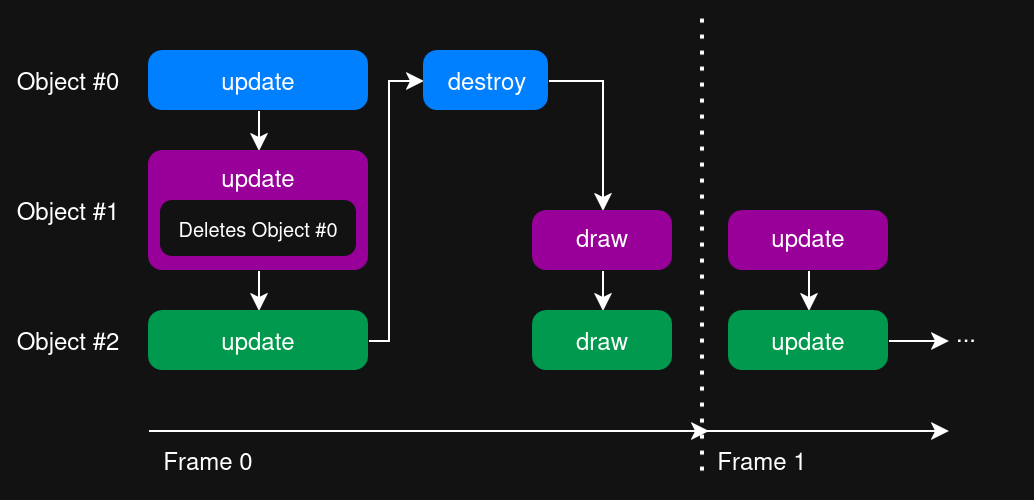
An object deletes an earlier object.
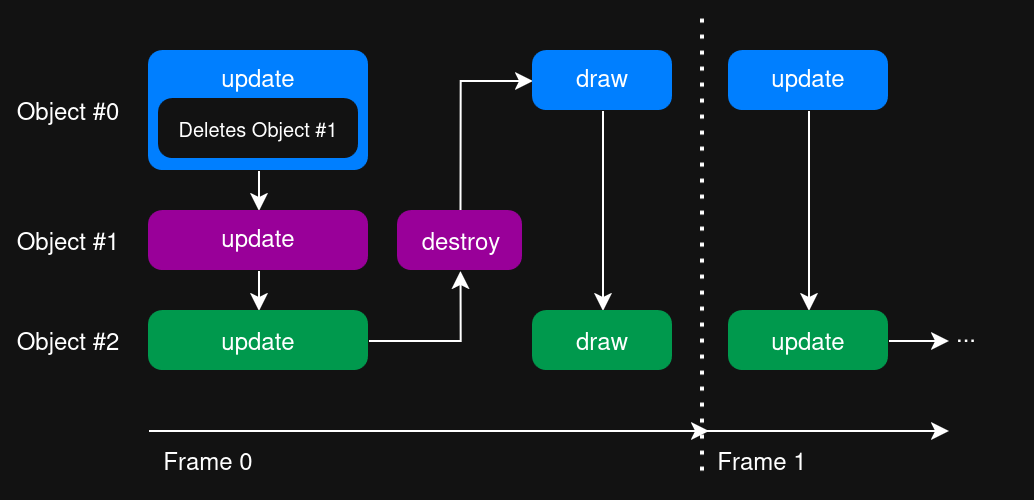
An object deletes a later object.
If the objects has children, they will also be deleted by default.
The relationship is checked during the initial delete call, not at the point of deletion.
Once in the deletion itself, the destroy function of all components are called.
Accessing other components at this stage is unsafe, as they may already be destroyed.
Access to the object itself is still safe.
Object State Changes
Objects also have a state that determines if they are active or not.
This means they still stay allocated and initialized, but do not get any update or draw calls.
Specifically: fixedUpdate, onColl, update, draw will not be called.
Events, so onEvent, are still dispatched,
since an object may want to implement logic to wake itself up.
Performing a state change introduces a bit of complexity, since it could happen at any time, including inside init of other objects.
Object may also spawn directly in a disabled state.
We can now look at the different relevant cases.
Spawning in a Disabled State
In the simplest case an object is already disabled, for example by marking it as such in the editor. It will still go through the entire initialization process, but as explained never gets called after.
Any special handling must be done in the init function,
for example the builtin collider component would skip adding it to the physics system.
Since the object itself is already accessible during init,
you can query the state there via obj.isEnabled().
Disabling an Object
It is possible to disable an object at runtime, by calling obj.setEnabled(false).
In order to avoid inconsistencies, it is once again deferred till after all update calls.
The draw is then skipped, and on the next frame the disable-event is received.
Just like with the delete, those two cases are therefore consistent:
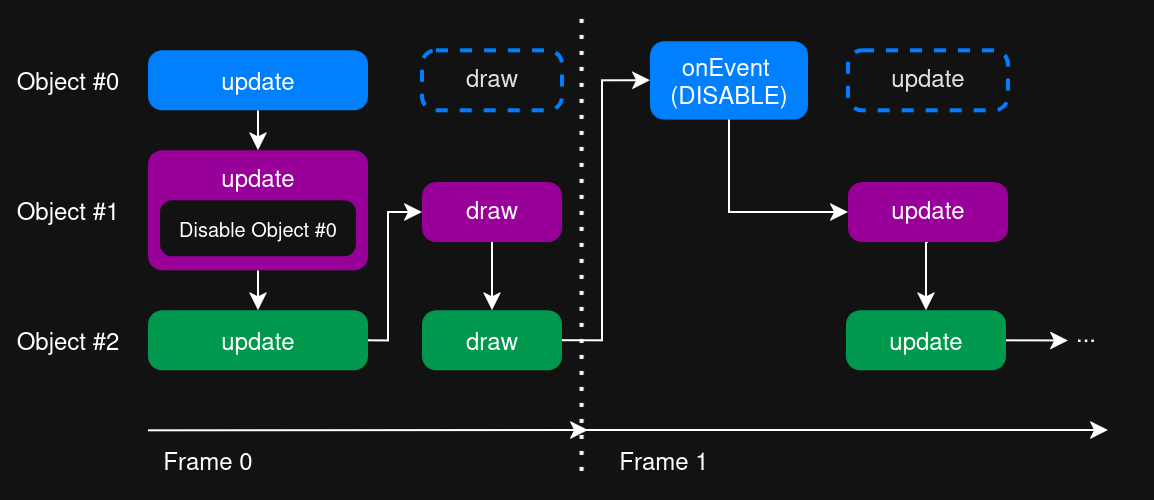
An object disables an earlier object.
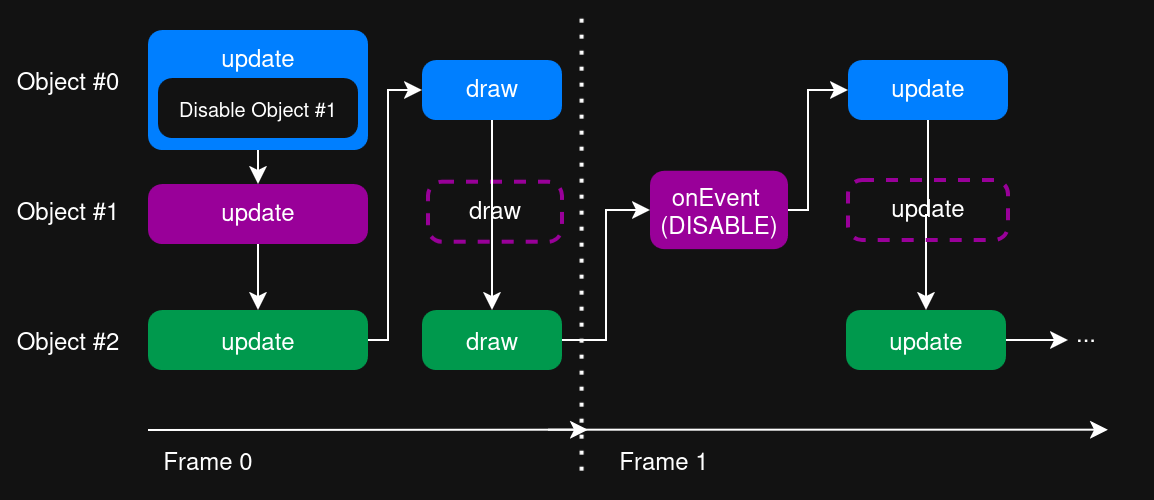
An object disables a later object.
Since disabling is deferred, it will also only happen once per frame.
Meaning you could have multiple objects that enable and disable the object over and over again.
However, only the last state after all updates is applied.
Enabling an Object
Effectively the opposite to the case before.
With the two versions once more: (this time starting one object in a disabled state)
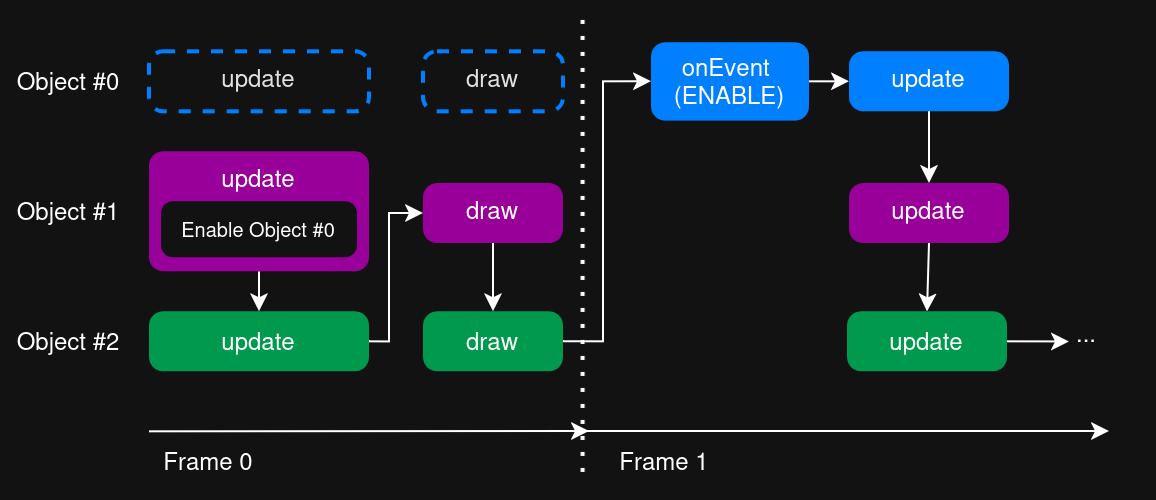
An object enables an earlier object.
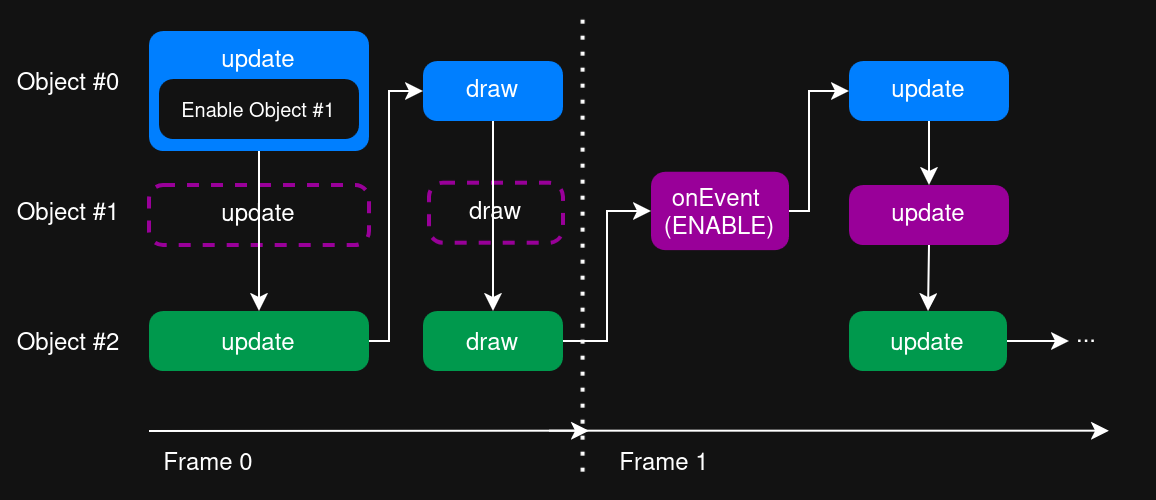
An object enables a later object.
So even if you enable an object that comes after you, it will only take effect the next frame.
Skipping the draw also prevents the issue of drawing something
without a previous update call being done.
Enable/Disable during init
One special case to this is if an object state gets changed during a scene load.
The object being referenced might not be initialized yet, leading to inconsistencies.
This is especially true since components may init differently based on the initial state.
Thankfully, the exact same logic as before is applied, causing it to be deferred as well.
In other words, all objects spawn exactly the same no matter if the state was changed or not.
It’s only at the start of the first frame (before any update) that the transition happens.
This is equivalent the last 4 graphics, where Frame 0 is replaced with the scene load.
Child-Objects
Each object carries both its own state, and the combined one including its parents.
This means while you can toggle an object to be active,
it may not become active if its parent is disabled.
This has no implications on the previous cases,
since the combined state is considered for any checks.
Events are also only emitted if the combined state changes.
So with a disabled parent, toggling a children state will do effectively nothing.
Conversely, if the parent gets enabled, all the children may now become active too and receive the enable event.