Character Body
The character body is special helper to implement movement of objects
that need non-physical behavior.
That is, they take part in the collision scene,
but need manual control over how collisions are resolved.
You most likely want this for controlling the player or certain enemies.
It handles gravity, collision sweeps, sliding along walls, stair stepping, and floor snapping.
This page covers how it works and the full C++ API.
If you’re looking for a usage example, check the char_body example project.
Overview
A character body represents a capsule-shaped physics volume attached to a scene object.
Each frame you set an input velocity and call moveAndSlide(), the body then:
Applies gravity (local up vector)
Sweeps the capsule through the collision scene
Slides along surfaces it hits
Steps over small obstacles (stairs)
Snaps to the floor on slopes and ledges
Moves with the object it’s standing on (optional, handles pos/rot/scaling)
Writes the resolved position back to the owning object
In contrast to actual colliders, it will never be moved by other colliders via forces.
It itself is also invisible to other real colliders / rigid-bodies.
Certain responses are handled differently to make it control well.
For example, standing on a slope will not make it slip off (unless you cross the defined threshold).
Capsule Shape
The capsule consists of a cylindrical middle section with hemispherical caps at both ends.
Its orientation is fixed to the defined up-axis in the settings.
Two distinct capsules exist internally:
Capsule |
Purpose |
|---|---|
Full capsule |
The full capsule matching your radius/height settings. |
Sweep capsule |
Shortened from the bottom by |
The centerOffset setting shifts the entire capsule relative to the object origin.
Typically you set this to place the capsule bottom at the object’s feet.
The following sections describe special cases and specific behaviors.
Behaviour
Wall Sliding
When moving across a surface, any collision with walls is resolved by ignoring the movement into the wall,
and moving the rest of the vector alongside it.
This lets the character body slide naturally along it.
Slope Following
When grounded on a walkable floor, the horizontal velocity is reshaped to follow the surface.
This means walking up or down a ramp keeps the character on the ground without manual input.
Going down a ramp (or off its edge) the floor probe reaches floorSnapDistance below the foot
and pulls the body back onto the slope, so it walks down smoothly instead of launching off and falling.
Stair Stepping
The physics capsule is shortened from the bottom by stepHeight.
Risers below this height are invisible to the sweep, so the capsule passes through them.
After the sweep, the floor probe detects the higher ground and lifts the character up.
For stair climbing to work, floorSnapDistance must be ≥ stepHeight.
The snap distance determines how far the probe reaches below the capsule to find the floor.
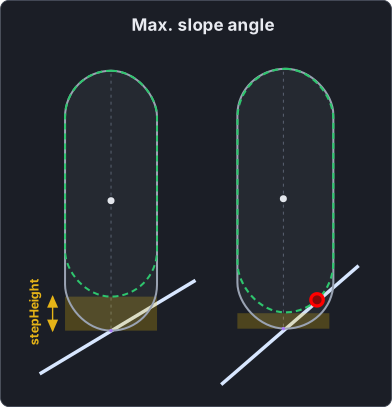
Slope Angle
A maximum allowed floor angle can also be defined.
Once a slope exceeds that, it is treated as a steep surface making the body slip off.
Make sure the maximum angle allowed doesn’t collide with the sweep-capsule.
Or in other words: radius and stepping height must allow the angle to not touch the bottom capsule.
Corner & Crease Handling
When the character is pushed into a V-shaped corner (two walls meeting at an angle),
the slide from each wall would point into the other, trapping the character.
This is detected internally and projects motion onto the intersection line of both planes,
so the character slides into the corner and stops once fully inside.
Without this, it would either oscillate side to side each frame
or get completely stuck (e.g.: unable to jump) once too deep into the corner.
Note that this problem can’t be avoided completely. with enough force or tiny/large capsule sizes, you may still face those issues partially.
Moving Platforms
When followFloor is enabled (default), the body is carried along with the mesh collider it currently stands on.
Each frame the contact point at the capsule foot is recorded in the mesh’s local space.
On the next frame the new world position of that same local point is read back and the body is shifted by the difference,
so the character rides translating and rotating platforms naturally.
Because the carry is driven by where that local point lands in world space,
the platform’s translation, rotation and scaling all move the body.
Only the body’s position is carried, not its rotation,
so the character does not visually spin with the platform.
If you need the character to face-spin with the platform,
apply the platform’s yaw delta to the object yourself.
Note
Floor-carry only applies to mesh colliders. The body can stand on and collide with a moving collider-body (e.g. a box), but it will not be carried along by it.
Up-Vector / Planets
The up-vector can be freely set and changed over time if needed.
The global physics gravity is not considered for anything, only the own up-vector.
All logic that determines what floors, walls, and angles are, will be relative to this vector.
Meaning you can easily implement something like planetary gravity:
Falling off edges
By default, a capsule has the annoying property that you can either balance off around edges,
or move way past a point you should be able to.
The former also allows going up a cliff again even though you should already be falling.
The character body avoids both by treating the foot as a singular point when needed.
Once past an edge it commits with the fall, and when hitting the sweep capsule, also slides off.
At low speeds, this will not be perfectly smooth.
However, to also handle various slope-related behaviors, this trade-off was needed.
Physics Interaction
As mentioned, a character body is only an observer, it will not cause collisions.
If you wish to do so, you can attach real body ontop of it.
Just make sure to setup the collision masks in such a way that they don’t see each other.
Here is an example of a attached sphere slightly above the foot, and inside the body:
Settings
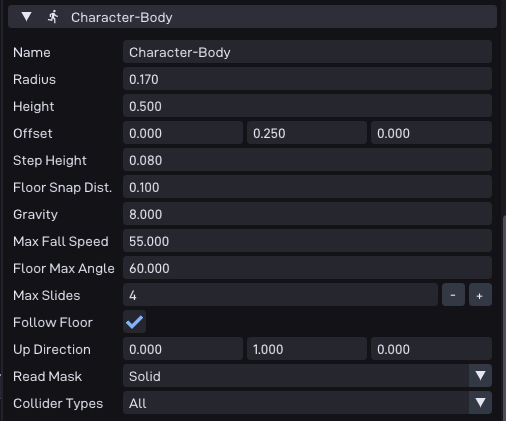
All parameters are configured through the Character-Body component in the editor.
When you add the component to an object, each setting appears as a UI field.
The table below maps each editor label to its C++ API name.
Editor Label |
API Name |
Type |
Default |
Description |
|---|---|---|---|---|
Radius |
|
|
|
Capsule radius in meters. |
Height |
|
|
|
Total capsule height in meters including both caps. Must be ≥ 2 × radius. |
Offset |
|
|
|
Offset in meters from the object origin to the capsule center. Use |
Step Height |
|
|
|
Max stair riser height the character automatically climbs. Must be ≤ inner half-height and ≤ Floor Snap Dist. |
Floor Snap Dist. |
|
|
|
How far below the capsule the floor probe reaches. Controls slope stickiness and snap-over-step distance. Must be ≥ Step Height. |
Gravity |
|
|
|
Downward acceleration along |
Max Fall Speed |
|
|
|
Terminal velocity along |
Floor Max Angle |
|
|
|
Maximum walkable slope angle (shown in degrees, stored in radians). Cosine is cached internally. Use |
Max Slides |
|
|
|
Maximum slide iterations per |
Follow Floor |
|
|
|
When enabled, the body is carried along with the mesh collider it is standing on as that mesh translates or rotates. Only position is carried; the body’s own rotation is not changed. |
Up Direction |
|
|
|
World up-direction. Determines gravity direction and what counts as a floor. Use |
Read Mask |
|
|
|
Collision layer read mask as a bitmask. Select which collision layers the body collides with. |
Collider Types |
|
|
|
Which collider types the body interacts with (Mesh, Collider Bodies, or All). |
Runtime API
When using the editor component, settings are applied via configure() automatically.
You only need the runtime accessors and setters:
const Settings& getSettings() const;            // read-only access to all settings
void setUp(const fm_vec3_t& newUp);             // change up direction (auto-normalized)
void setCenterOffset(const fm_vec3_t& offset);   // change capsule center offset
If you create the body programmatically, also call configure() once at init:
void configure(const Settings& s); // bulk-apply settings + refresh caches
Movement
Input Velocity vs. Internal Velocity
The character body separates desired movement from the resolved velocity:
inputVelocity: Set this each frame to the movement you want. It represents player/AI intent and is preserved across frames. Only the horizontal component (perpendicular toup) is used; the vertical component is always ignored.Internal velocity: Managed by
moveAndSlide(). Gravity is added to it, slides modify it, and floor contact zeroes the vertical component. Read it viagetVelocity().
// Set desired horizontal movement
charBody.inputVelocity = {moveX, 0.0f, moveZ};

// For a jump, directly modify internal velocity
charBody.setVelocity(charBody.getVelocity() + up * jumpSpeed);
moveAndSlide
void moveAndSlide(float deltaTime);
This is the main update function. Call it once per frame, typically from update() or fixedUpdate().
Make sure to call it even if you don’t move to apply gravity.
The collision scene is retrieved internally via SceneManager::getCurrent().
State Queries
After moveAndSlide() completes, you can query the body’s state:
bool isOnFloor() const;
Returns true when standing on a walkable floor or steep surface.
bool isOnSteepSurface() const;
Returns true when on a surface steeper than floorMaxAngle.
In this state isOnFloor() also returns true, use this to distinguish between normal ground and steep slopes.
const fm_vec3_t& floorNormal() const;
Returns the normal of the surface the character is standing on.
Includes both walkable floors and steep surfaces.
Teleport
void teleport(const fm_vec3_t& ownerPos, bool resetForces = true);
Instantly moves the character to a new position.
With resetForces = true (default), also zeroes velocity and clears grounded state, use for respawning.
With resetForces = false, only the position changes, use for portals or seamless teleports.
// Respawn at a checkpoint
charBody.teleport({spawnX, spawnY, spawnZ});

// Portal teleport preserving momentum
charBody.teleport({destX, destY, destZ}, false);
Debug Draw
void debugDraw() const;
Draws the capsule shape and floor-snap probe in debug wireframe.
Call once per frame after moveAndSlide().
The debug visualization uses color coding:
Color |
Meaning |
|---|---|
White |
Airborne, capsule is not touching any surface |
Green |
On a walkable floor |
Orange |
On a steep surface |
Yellow line |
Step zone indicator at the bottom of the physics capsule |
Blue line |
Floor snap probe ray, reaches from capsule center downward |
Cyan line |
Contact normal direction from the capsule bottom |
Dark grey outline |
Full logical capsule (for comparison with the shortened physics capsule) |
Usage Example
Via the Editor Component (recommended)
The typical workflow: add a Character-Body component to an object in the editor,
configure its settings in the inspector, then access it from your user script.
#include "scene/components/charBody.h"

void update(Object& obj, Data* data, float deltaTime)
{
  // Get the character body from the editor-assigned component
  auto &body = obj.getComponent<P64::Comp::CharBody>()->getBody();

  // Change up direction at runtime (e.g. planet gravity transition)
  body.setUp(data->currentUp);

  // Read the current up for camera alignment / movement math
  const fm_vec3_t up = body.getSettings().up;

  // Set desired horizontal movement from player input
  body.inputVelocity = {moveX, 0.0f, moveZ};

  // Jump, override internal velocity along up
  if(jumpPressed && body.isOnFloor()) {
    body.setVelocity(body.getVelocity() + up * jumpSpeed);
  }

  // Run physics, collision scene is retrieved internally
  body.moveAndSlide(deltaTime);

  // Query state after the step
  if(body.isOnFloor()) {
    // normal ground or steep surface
  }
  if(body.isOnSteepSurface()) {
    // slope too steep to walk on
  }

  // Debug overlay (hold Z in the char_body example)
  body.debugDraw();
}
Programmatic Setup (without editor)
If you need to create a character body entirely from code,
construct it directly and call configure():
#include "collision/characterBody.h"

void init(Object& obj, Data* data)
{
  data->charBody = Coll::CharacterBody(&obj);

  data->charBody.configure({
    .up               = {0.0f, 1.0f, 0.0f},
    .centerOffset     = {0.0f, 1.0f, 0.0f},   // place capsule bottom at origin
    .gravity          = 30.0f,
    .maxFallSpeed     = 55.0f,
    .floorMaxAngle    = 45.0_deg,
    .stepHeight       = 0.25f,
    .floorSnapDistance = 0.30f,
    .radius           = 0.25f,
    .height           = 1.0f,
    .collTypes        = Coll::RaycastColliderTypeFlags::MESH_COLLIDERS,
    .maxSlides        = 4,
    .readMask         = 0xFF,
    .followFloor      = true,
  });
}

void update(Object& obj, Data* data, float deltaTime)
{
  auto& body = data->charBody;
  // ... same usage as the component example above
}
For a complete example with camera controls, jumping, coyote time, planet gravity,
and steep-surface speed reduction, see the char_body example project in the repository.