Camera
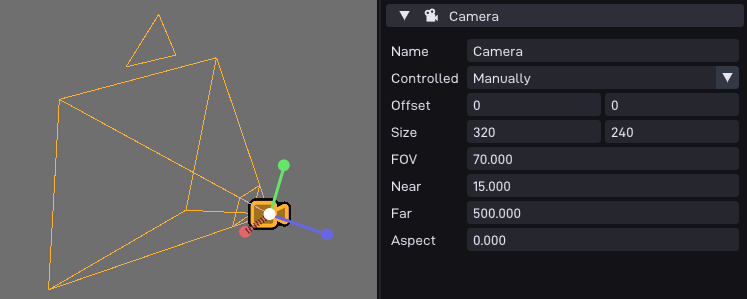
Turns the object into a camera that renders the scene to a viewport.
Multiple cameras can be active at once (e.g. for split-screen).
Options
Option |
Description |
|---|---|
Controlled |
How the camera transform is driven: |
Projection |
How the scene is projected: |
Offset |
The viewport’s top-left offset on screen, in pixels. |
Size |
The viewport’s size on screen, in pixels. |
FOV |
Vertical field of view, in degrees. Only used in perspective mode. |
Ortho Size |
Vertical half-size of the visible area, in meters. The horizontal size is derived from it via the aspect ratio. Only used in orthographic mode. |
Near |
Near clip plane distance, in meters. |
Far |
Far clip plane distance, in meters. |
Aspect |
Aspect ratio used for the projection. |
Target |
Where the camera renders to: |
Surface Object |
Only in Surface mode: the object whose (first) Surface component is rendered into. With <None> selected the camera renders nothing. |
Sees Layers |
Visibility layers this camera renders. An object is only drawn if it shares at least one layer with the camera (set via Visibility in the object inspector). By default a camera sees all layers. Layers can be named in the project settings. |
Rendering to a surface
In Surface mode the camera renders into a Surface component instead of
the screen, e.g. for mirrors, security monitors or portals.
The viewport is automatically fitted (and scissored) to the surface size.
Note that the surface must use a format the RDP can render to (RGBA16, RGBA32 or I8/CI8).
If the surface has its Depth Buffer option enabled, the camera renders with it. Otherwise it temporarily re-uses the main depth buffer, which overwrites part of its contents mid-frame: if you see depth artifacts on other cameras when using extra draw-layers, give the surface its own depth buffer.
The target can also be changed at runtime:
auto* cam = obj.getComponent<P64::Comp::Camera>();

cam->camera.setTargetSurface(surfObj);        // object, uses its first Surface component
cam->camera.setTargetSurface(&surf);          // or a raw surface_t* (caller manages its lifetime!)
cam->camera.setTargetSurface(&surf, &depth);  // ...optionally with a depth buffer (>= color size)
cam->camera.setTargetScreen();                // back to the framebuffer

// passing nullptr (or an object without a Surface component) disables
// rendering entirely, the same happens if the target object gets deleted
cam->camera.setTargetSurface(nullptr);
Switching the projection at runtime
The projection can be changed while the game is running:
auto* cam = obj.getComponent<P64::Comp::Camera>();

cam->setOrthographic(3.0f);                   // switch to ortho with a given size (meters)
cam->setPerspective(T3D_DEG_TO_RAD(65.0f));   // switch to perspective with a given fov

// or toggle without touching the fov / ortho-size:
cam->setProjection(P64::Comp::Camera::Projection::ORTHOGRAPHIC);
See also
P64::Comp::Camera: the runtime component in the C++ API.